A Complete Guide for 2026 Creators
Selling planners and printables has become one of the most reliable ways to earn income on Etsy, Shopify, and other marketplaces. And while the industry has evolved from minimalist bullet journals to full digital workspaces, one trend continues to rise above everything else:
Simple, one-page templates.
In 2026, customers are choosing quick, printable layouts over bulky planners. Sellers are building large inventories fast. And platforms like Planify Pro are making it easier than ever to design planner pages, create custom layout variations, and launch personalized planner products in minutes.
This guide breaks down why one-page templates work, which types sell the best, and how you can build a high-performing storefront—without creating a 100-page planner.
Why One-Page Templates Lead the 2026 Market
One-page designs outperform big planners for a few reasons. At their core, they solve the user’s everyday problem with minimal steps. But there are deeper business advantages for sellers as well.
1. Instant gratification for customers
People buy printables because they want something they can start using right now. A one-page to do list, habit tracker, or notepad offers:
Zero setup
One-click printing
Easy digital import into apps like Goodnotes, Notability, or any digital planner
No commitment to a full dated planner
For busy students, parents, or professionals, a single useful sheet is easier than navigating a long PDF.
2. Higher perceived value at a lower price
Customers don’t mind paying $1–$4 for a one-page template because:
The risk feels low
They know they can reuse it endlessly
They can mix and match their own system
This leads to better conversion rates—especially when you offer bundles like “50 Printable Notepads” or “12 Habit Trackers for 2026.”
3. Sellers can scale faster
A full 2027 planner might take days or weeks to create. But one-page templates?
You can produce:
10 designs per day
50 designs per week
200+ listings per month
More listings = more visibility. Etsy rewards consistent uploads, and one-page products give you the volume advantage.
4. Easy customization for personalized planners
Customers love personalization. With a one-page layout, adding:
Names
Colors
Themes
Custom categories
…takes less than a minute using a planner maker like Planify Pro.
This is a key advantage for creators selling personalized planner pages or custom 2026 planner inserts.
5. Works in both print and digital formats
One page is universal:
Print at home
Insert into binders
Add to a digital planner
Use as a desktop notepad
Customers appreciate flexibility, and sellers attract more buyers with multi-use designs.
The Most Profitable One-Page Templates in 2026
Below is a breakdown of the highest-selling formats based on marketplace trends, customer behavior, and seasonal search patterns.
1. One-Page To-Do Lists
To-do lists are evergreen. Everyone needs them, whether they’re managing school, work, or daily chores.
Why They Sell
They help customers achieve quick wins
Easy to understand, universally useful
Work great as themed bundles (e.g., floral, minimalist, pastel, seasonal)
Best Variations
Priority-based lists (“Top 3 Tasks”)
Morning/Evening task split
Weekly overview on one sheet
Color-coded versions
Aesthetic or themed designs (2026 trends: muted tones, modern abstract, celestial)
2. One-Page Habit Trackers
Habit trackers remain a top seller, especially among wellness, productivity, and self-improvement buyers. Learn more about why habit tracking works in digital planners.
Why They Work
They support 2026’s major trend: holistic productivity
They fit perfectly inside digital planners
They can be used for fitness, routines, goals, and more
Popular Habit Tracker Types
Monthly grid tracker
7-day weekly tracker
Mood + habit hybrid tracker
Health/water/meal tracker
Yearly overview (one page with all 12 months)
Design Tips for High Conversion
Keep layout clean with clear checkboxes
Add space for notes or reflections
Offer both light and dark mode for digital planner users
Create bundle sets (e.g., “12 Monthly Trackers for 2026”)
3. Simple One-Page Notepads
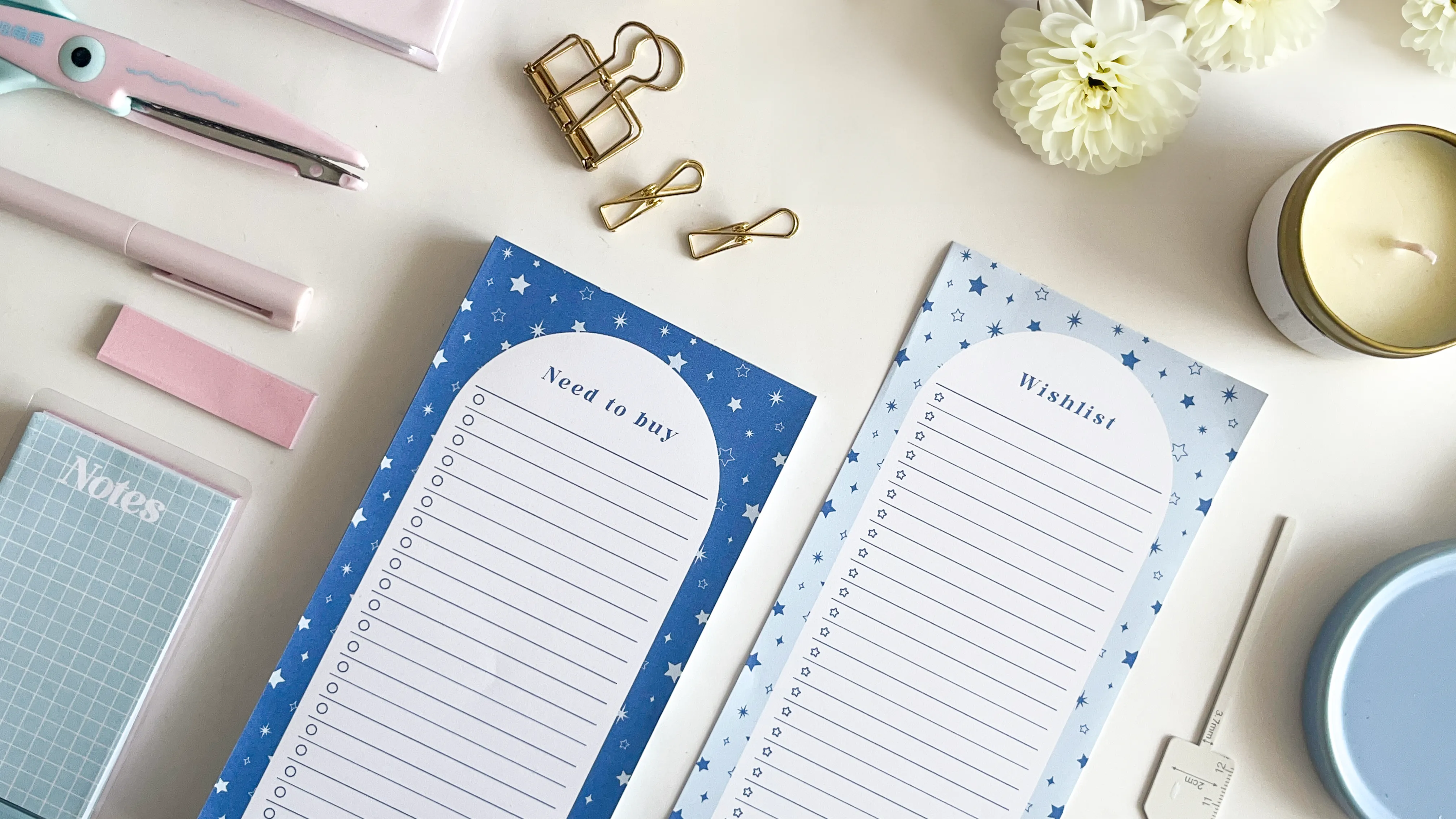
Notepads are underrated best-sellers. Shoppers often buy multiple designs at once because they’re affordable and functional. For creative notepad ideas, check out our guide on how to decorate notepads with Planify Pro and sell them.
Why They Sell
Highly giftable
Perfect for personal and office use
Easy for customers to print in bulk
Popular as custom or personalized planner inserts
Top Notepad Styles for 2026
Lined notes
Dotted grid notes
Cornell-style notes (students love these)
Sticky-note sized templates
Phone call / meeting notes
Recipe quick notes
Gratitude or reflection notes
These can also be branded with names, initials, or themes—ideal for personalized planner customers.
How to Design Best-Selling One-Page Templates Fast
Creating 200+ listings a year is completely achievable when you use an efficient workflow.
Here’s a guide to designing planner pages using Planify Pro, which is optimized for one-page templates.
1. Start with a clear structure
Every template should follow a clean layout:
Title or header
Sections divided with spacing
Simple iconography or small design accents
Balanced margins for printing
Easy-to-read typography
Minimalist designs tend to sell best because they fit more audiences.
2. Use consistent themes and collections
Collections help your shop look cohesive.
Examples of collections:
Midnight Garden
Pastel Bloom
Modern Abstract
Soft Minimal
Celestial Lunar
These can be reused across:
To-do lists
Habit trackers
Notepads
2026 planner pages
Digital planner inserts
Sellers love that Planify Pro automatically applies themes across multiple page layouts. Browse our planner collection templates for inspiration—from the playful Happy Abstract Collection to the cozy Soft Paws Collection and the romantic Love Poison Collection.
3. Use Planify Pro’s planner maker for fast variations
Planify Pro allows you to:
Create a base design
Duplicate it instantly
Swap colors, headers, and patterns
Add personalization fields
Export both PDF and PNG formats
Prepare multiple sizes (A4, A5, US Letter, Half Letter)
This makes it easy to build:
A “2026 Planner Notepad Set”
A “Daily To Do List Bundle”
A “Habit Tracker 12-Pack”
Within minutes, you can turn one template into twenty.
4. Add personalization options for higher pricing
Personalized planners sell for 2–4× the price of standard printables.
Buyers may request:
Their name
A special quote
Custom colors
Specific layout tweaks
Planify Pro makes this simple with editable text fields and design components you can change quickly.
5. Test both print and digital versions
Your customers fall into two groups:
Print-at-home Users
Prefer light backgrounds
Need clear black text
Like space for hole-punch margins
Use A4 or US Letter mostly
Digital Planner Users
Prefer dark mode versions
Want hyperlinked versions (optional)
Prefer portrait layouts
Use Goodnotes, Notability, or Samsung Notes
Offering both formats increases conversions. Need the right equipment? Read our guide on the best printers for making and selling planners.
2026 Trends Shaping the Planner Market
To stay competitive, it helps to understand what customers are gravitating toward in 2026. For a deeper look at planner styles, read Colorful vs. Minimal: Which 2026 Planner Matches Your Style?
Trend 1: Modular Planning Systems
People no longer want a single, rigid planner. They prefer mixing pieces:
Weekly page + habit tracker
To-do list + meal planner
Notepad + calendar insert
One-page templates fit perfectly into this shift.
Trend 2: Hybrid Paper + Digital Planning
Users mix:
Printed sheets for desk work
Digital planner pages on tablets
Dual-format design is now a must.
Trend 3: Personalized Products
Buyers are increasingly searching for:
“custom planner”
“personalized planner printable”
“customized notepad”
Names and monograms convert extremely well.
Trend 4: Visual Simplicity
Markets show a shift toward:
Minimal spacing
Calm color palettes
Soft geometric shapes
Neutral and earthy tones
Simple ≠ boring. Simple = sellable.
Trend 5: Year-specific pages (high demand in Q4 2025–Q1 2026)
Examples:
2026 planner pages
2026 monthly calendars
Year-at-a-glance overviews
2026 goal-setting sheets
Attach these to your one-page templates for seasonal spikes.
How to Build a Full Shop Using Only One-Page Templates
Here’s a strategic guide for turning small, simple pages into a scalable collection. For a complete roadmap, also read what you need to start a planner shop.
Step 1: Build 10 Core Template Types
These should include your essentials:
Daily to-do list
Weekly to-do list
Monthly habit tracker
Weekly habit tracker
General lined notepad
Dot grid notepad
Cornell notes
Daily planner page
Goal-setting sheet
2026 planner overview
Step 2: Create 3 Designs per Template
Use themes like:
Minimal
Floral
Abstract
That’s already 30 listings.
Step 3: Create bundles
Examples:
“Mega To-Do List Pack (20 Pages)”
“12-Month Habit Tracker Set (2026 Edition)”
“Aesthetic Printable Notepad Collection”
Bundles increase average order value. Learn more about boosting planner sales with bundles.
Step 4: Add personalized planner versions
Duplicate your popular layouts and add name fields.
Personalized pages can sell for 3× more.
Step 5: Add digital planner versions
Export PNG or PDF files sized for:
Goodnotes
iPad digital planning
Portrait 8.5×11
A4/A5
Now you’re reaching both digital and print audiences.
Product Ideas You Can Make in Under 10 Minutes with Planify Pro
Use these ideas to fill your shop quickly. For even more inspiration, browse our 50+ planner template ideas for sellers:
2026 planner notepad (daily or weekly)
One-page to do list with priorities
Aesthetic weekly dashboard
Morning/evening reset sheet
Cleaning checklist
Fitness or wellness tracker
Small business finance tracker
Study schedule page
Daily gratitude notepad
Quick recipe card
Digital planner sticky notes
Water tracker
Sleep log
Minimal project planner page
Personalized monogram notepad
These sell exceptionally well because they solve highly specific problems.
How to Optimize Your Listings for Higher Sales
Even the best designs won’t sell without strong SEO. Here’s a quick framework.
1. Use powerful keywords naturally
Suggested keywords for this article include:
2026 planner
notepad
to do list
habit tracker
digital planner
custom planner
personalized planner
planner maker
design planner
Use them in:
Title
Description
Tags
Image ALT text
PDF filename
2. Write clear, benefit-driven descriptions
Explain:
What the customer gets
How they can use it
Why it saves time
What formats are included
Why the design is special
Always list size options and use cases.
3. Show multiple previews
Mockups that include:
Tablet view (for digital planners)
Printed sheet on a desk
Close-up of the boxes or sections
Themed collection bundle shots
Visual storytelling increases trust.
4. Offer multiple file formats
Customers may want:
PDF
PNG
JPEG
Goodnotes file
ZIP folder
More formats = fewer refund requests.
Simple Templates, Big Results
The 2026 planner market is shifting—and one-page templates are at the center of it.
Customers want:
Simple tools
Quick downloads
Flexible layouts
Affordable options
Print + digital compatibility
Sellers want:
Easy creation
Scalable listings
Higher shop visibility
Fast personalization
One-page to-do lists, habit trackers, and printable notepads strike the perfect balance. They’re easy to make, easy to personalize, and easy to sell in both the planner and digital stationery markets.
With Planify Pro’s planner maker, creators can produce dozens of templates in minutes—professional, cohesive, and ready for Etsy, KDP, or your own shop.
If your 2026 goal is to build a thriving digital product business, start with the simplest path:
One page. One purpose. Unlimited potential.
Ready to take the next step? Explore our ultimate custom planner maker guide to find the best design tools, and see our complete guide to starting a profitable planner business on Etsy.
Want more tips and inspiration for building your own custom planner or launching a personalized planner brand? Check out our blog for a helpful beginner’s guide: “What You Need to Start a Planner Shop” and Courses to help you get started. Planify Pro has more DIY tips to help you personalize your planner, whether you’re designing a gift, building a product line, or just creating a layout that works for you.
Don’t forget to visit our Instagram, YouTube, and Pinterest for more inspiration—and to explore our wide selection of premade planner templates, design stickers, and fonts for making your own personalized planner. Thinking about where to sell? Compare your options in our Etsy vs Shopify guide. For selling tips, read about the power of niche markets and learn to avoid common mistakes when selling digital planners. Let Planify Pro help you on your journey to planner success!
Horizontal 2